What Is eBay Seller Hub? Features, Benefits & Best Alternatives
Running a successful eBay store involves much more than publishing listings. As your product catalog grows, you'll need to manage orders, monitor sales, update inventory, and keep track of store performance. Doing all of this manually can quickly become time-consuming.
That's where TeemDrop and eBay Seller Hub can play different but complementary roles. eBay Seller Hub is eBay's free dashboard for managing your store, while TeemDrop helps automate sourcing, inventory management, and order fulfillment for sellers who want to scale more efficiently.
In this guide, you'll learn what eBay Seller Hub is, who it's designed for, its most useful features, and its strengths and limitations. You'll also discover when Seller Hub is enough on its own and when adding a third-party platform can simplify your workflow.
Quick Answer
eBay Seller Hub is eBay's free dashboard for managing listings, orders, marketing, and seller performance. It's ideal for running an eBay store, but it doesn't include product sourcing or automated fulfillment. Growing sellers often combine Seller Hub with third-party platforms like TeemDrop to streamline operations.
At a Glance
| Feature |
Details |
| Platform |
eBay Seller Hub |
| Price |
Free |
| Best For |
Individual sellers, small businesses, and growing eBay stores |
| Main Functions |
Listings, Orders, Marketing, Performance, Research |
| Marketplace Support |
eBay only |
| Mobile Access |
Available through the eBay Seller Hub app and the eBay mobile app (limited features) |
| Best For Automation |
Third-party tools like TeemDrop |
| Learning Curve |
Beginner-friendly |
What Is eBay Seller Hub?
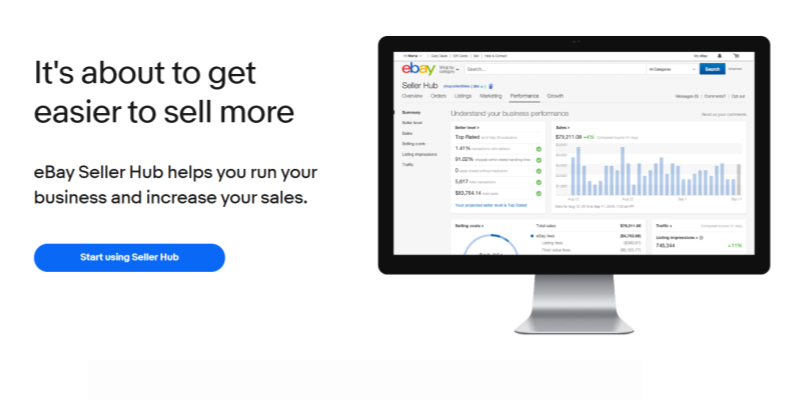
eBay Seller Hub is the official dashboard that eBay provides to help sellers manage their business from one place. Instead of switching between multiple pages, you can create listings, process orders, monitor sales performance, and access marketing tools through a single interface.[1]
Many people also search for terms like seller hub, seller eBay hub, or selling hub. These all refer to the same platform. "Seller Hub" is the official product name, while the other phrases are common search variations.
One reason Seller Hub is popular is that it's free. Eligible sellers can access it without paying for additional software, making it a practical starting point for beginners and small businesses.
However, it's important to understand its purpose. Seller Hub is designed to help you manage an eBay store—it isn't an all-in-one ecommerce platform. It doesn't help you source products, find suppliers, or automate order fulfillment. If your business relies on dropshipping or sells across multiple marketplaces, you'll likely need additional tools as your operations become more complex.
For that reason, many experienced sellers use Seller Hub as their control center while relying on specialized platforms to automate tasks outside eBay.
Who Should Use eBay Seller Hub?
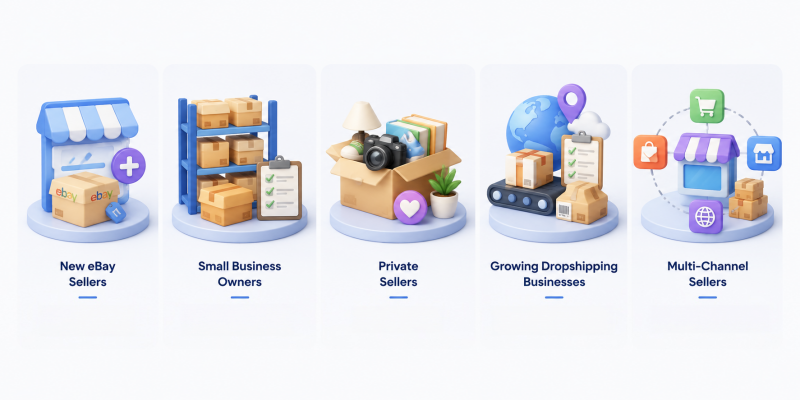
One of the biggest advantages of eBay Seller Hub is that it's suitable for sellers at different stages of their business. Whether you're selling a few products every month or running a growing ecommerce operation, the dashboard provides useful management tools.
New eBay Sellers
If you're just starting, eBay Seller Hub gives you a simple way to manage listings and monitor your first sales. Everything is organized in one dashboard, making it easier to learn how selling on eBay works.
Small Business Owners
For businesses with a steady number of orders, Seller Hub helps organize inventory, shipping, and customer communication without requiring additional software.
eBay Seller Hub for Private Sellers
Many people search for eBay Seller Hub for private sellers because they occasionally sell used or personal items. Private sellers can also access Seller Hub if it's available for their account. While they may not need every feature, the dashboard still provides useful sales tracking and listing management tools.
Growing Dropshipping Businesses
As order volume increases, manual work becomes more challenging. While Seller Hub provides reporting and order management, it doesn't automatically source products, sync supplier inventory, or fulfill customer orders. Sellers looking to improve inventory management and automate these processes often connect third-party platforms to reduce repetitive tasks.
Multi-Channel Sellers
If you sell on Shopify, Amazon, TikTok Shop, Etsy, or your own website in addition to eBay, Seller Hub may not be enough because it only manages eBay activity. Multi-channel sellers usually benefit from additional tools that centralize inventory and multi-channel fulfillment across multiple platforms.
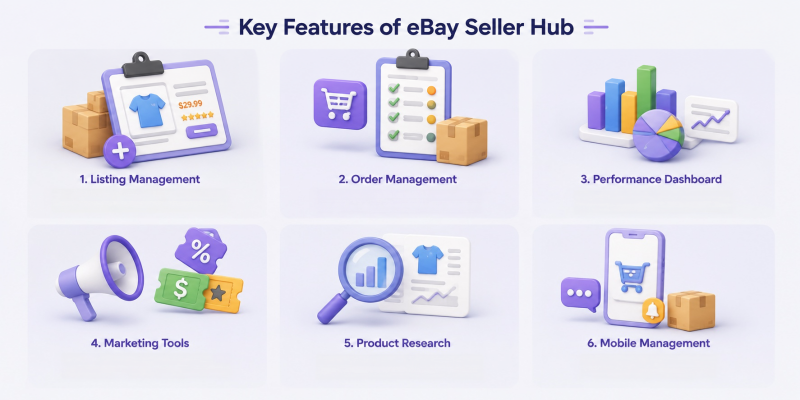
Key Features of eBay Seller Hub
The biggest strength of eBay Seller Hub is bringing your selling activities together in one dashboard. Instead of opening multiple pages, you can monitor your business from a single interface.
Here are its core features.
Listing Management
Creating, editing, and organizing listings is one of the most frequently used functions.
You can:
- Create new product listings
- Edit titles, descriptions, and pricing
- Update item quantities
- Monitor active and unsold listings
- Relist expired products
For beginners, this makes product management much more straightforward.
Order Management
Seller Hub allows you to monitor every stage of an order.
You can quickly view:
- Orders awaiting payment
- Orders ready to ship
- Completed orders
- Canceled orders
- Return requests
Having everything in one place reduces the chance of missing important updates.
Performance Dashboard
One of the most valuable sections is the performance dashboard.
It provides important business metrics such as:
- Sales trends
- Traffic
- Conversion rates
- Buyer activity
- Seller performance
These reports help sellers understand what's working and where improvements are needed.[2]
Marketing Tools
Seller Hub includes built-in marketing features that help increase product visibility.
These include:
- Promoted Listings
- Discounts and offers
- Coupons
- Markdown sales
- Promotional campaigns
These tools can help attract more buyers without leaving the Seller Hub interface.
Product Research
Seller Hub includes access to Terapeak Product Research in many markets, allowing sellers to study market demand, pricing trends, and successful listings before choosing products.[3]
This information can help sellers make better product decisions instead of relying on guesswork.
Mobile Management
Many sellers also ask about my seller hub and whether they can manage it on mobile.
While the desktop version provides the complete experience, sellers can access many features through the eBay mobile app, making it easier to check orders, monitor listings, and respond to buyers when away from their computer.[4] However, some advanced management features are still easier to use on desktop.
Pros of eBay Seller Hub
Like any ecommerce tool, Seller Hub has strengths that make it a popular choice among eBay sellers.
| Advantage |
Why It Matters |
| Free to Use |
No additional subscription is required for eligible sellers. |
| Beginner-Friendly |
The dashboard is simple to navigate, even for first-time sellers. |
| Official eBay Integration |
Listings, orders, and seller metrics update automatically. |
| Centralized Dashboard |
Manage products, orders, marketing, and reports in one place. |
| Built-in Analytics |
Performance reports help sellers track business growth. |
The biggest advantage of eBay Seller Hub is convenience. Everything related to your eBay business is organized in a single workspace, reducing the need to switch between different pages.
For beginners, this makes learning the platform much easier. For experienced sellers, the reporting tools provide useful insights for monitoring store performance and identifying opportunities for improvement.
Cons of eBay Seller Hub
While eBay Seller Hub is a powerful management dashboard, it isn't designed to handle every part of running an ecommerce business. As your store grows, some limitations become more noticeable.
| Limitation |
Impact |
| eBay Only |
Cannot manage Shopify, Amazon, Etsy, or other sales channels. |
| Limited Automation |
Most inventory and fulfillment tasks still require manual work. |
| No Product Sourcing |
Doesn't help sellers find suppliers or products. |
| Basic Inventory Sync |
Inventory updates are limited to eBay. |
| No Built-in Fulfillment |
Orders must be fulfilled manually or through external services. |
For many sellers, these limitations aren't a problem in the beginning. However, stores with hundreds of products or multiple sales channels often need additional software to automate repetitive tasks and reduce manual work.
eBay Seller Hub vs TeemDrop vs AutoDS
eBay Seller Hub is an excellent management dashboard, but it's important to understand what it is designed to do—and what it isn't.
Seller Hub focuses on helping sellers manage their eBay business. It organizes listings, orders, marketing campaigns, and performance reports in one place. However, it doesn't cover the entire ecommerce workflow, especially for sellers using dropshipping or selling on multiple marketplaces.
This is where third-party platforms become valuable. Instead of replacing Seller Hub, they extend its capabilities by automating repetitive tasks and connecting your store with suppliers and fulfillment services.
| Feature |
eBay Seller Hub |
TeemDrop |
AutoDS |
| Listing Management |
✅ |
✅ |
✅ |
| Order Management |
✅ |
✅ |
✅ |
| Sales Reports |
✅ |
Limited |
Limited |
| Product Sourcing |
❌ |
✅ |
✅ |
| Verified Supplier Network |
❌ |
✅ |
✅ |
| Automated Order Fulfillment |
❌ |
✅ |
✅ |
| Inventory Sync |
Limited |
✅ |
✅ |
| Multi-Platform Support |
❌ |
✅ |
✅ |
| Private Label & Custom Packaging |
❌ |
✅ |
Limited |
| Warehouse Services |
❌ |
✅ |
Limited |
For example, a seller can continue using Seller Hub to manage listings and monitor store performance while using TeemDrop to source products, synchronize inventory, and automate fulfillment. This combination reduces manual work without changing the familiar eBay workflow.
The right choice depends on your business goals. If you're selling only on eBay with a small catalog, Seller Hub may be enough. As your store grows, automation becomes increasingly valuable.
When Is eBay Seller Hub Enough?
If your business matches the situations below, Seller Hub may be all you need:
- You only sell on eBay.
- Your product catalog is relatively small.
- You manually manage inventory and orders.
- You don't require automated fulfillment.
- You want a free solution with official eBay support.
For new sellers, starting with Seller Hub keeps costs low while providing the essential tools needed to operate an eBay store.

When Should You Use a Third-Party Tool?
As your business expands, manual processes can become one of the biggest barriers to growth.
If you spend hours updating inventory, placing supplier orders, or managing products across multiple marketplaces, adding a third-party platform can save significant time.
You may benefit from a third-party solution if you:
- Run a dropshipping business
- Sell on multiple ecommerce platforms
- Need automatic inventory synchronization
- Want faster order fulfillment
- Source products from multiple suppliers
- Plan to build your own brand with custom packaging
- Want to reduce repetitive manual work
For example, TeemDrop helps sellers post a sourcing request on TeemDrop, source products directly from trusted suppliers, automate fulfillment, and manage inventory across different sales channels to build a stronger dropshipping business. Instead of replacing eBay Seller Hub, it works alongside it by handling tasks that Seller Hub doesn't cover.
For many growing businesses, this combination creates a more scalable workflow while allowing Seller Hub to remain the primary dashboard for eBay management.
Conclusion
eBay Seller Hub is one of the best free tools available for managing an eBay store. It provides a centralized dashboard for listings, orders, marketing, and business performance, making it an excellent choice for beginners and experienced sellers alike.
However, as your business grows, you'll likely need more than store management alone. Tasks like sourcing products, synchronizing inventory, and automating fulfillment are outside Seller Hub's core capabilities.
Rather than viewing Seller Hub and third-party platforms as competitors, it's more helpful to see them as complementary tools. Seller Hub helps you manage your eBay business, while solutions like TeemDrop can streamline the operational work behind it. Together, they create a more efficient workflow that supports long-term growth.
FAQ
Is eBay Seller Hub free?
Yes. eBay Seller Hub is free for eligible eBay sellers and includes listing management, order tracking, marketing tools, and performance reports.
How to get to eBay Seller Hub?
Many new sellers search for how to get to eBay Seller Hub after creating an account.
To access it:
- Sign in to your eBay account.
- Open the Selling section.
- Select Seller Hub if it's available.
- Complete the setup if prompted.
Once activated, Seller Hub becomes your main dashboard for managing your store.
Can I use eBay Seller Hub on app?
Yes, many Seller Hub features can be accessed through the eBay mobile app. You can monitor orders, respond to buyers, and check listings while away from your computer. However, some advanced management tools are still easier to use on the desktop version.
Is eBay Seller Hub for private sellers available?
Yes. Private sellers can also use Seller Hub if it's available for their account. While casual sellers may not need every feature, the dashboard can still help organize listings and track sales.
Can Seller Hub automate dropshipping?
No. Seller Hub helps manage your eBay store but doesn't automate product sourcing or fulfillment. Sellers who use dropshipping typically connect Seller Hub with third-party platforms to automate these tasks.
References
[1] eBay Seller Center – Seller Hub Overview
https://www.ebay.com/sellercenter/sellerhub
[2] eBay Help – Seller Hub
https://www.ebay.com/help/selling/selling-tools/seller-hub?id=4095
[3] eBay Help – Terapeak Research
https://www.ebay.com/help/selling/selling-tools/terapeak-research?id=4853
[4] eBay Mobile App Help
https://www.ebay.com/help/account/changing-account-settings/ebay-mobile-app?id=4203