


 Apr 09, 2026
How to handle with Invalid Orders?
Invalid orders refer to those that have been synced to TeemDrop but cannot be processed for payment due to various issues. On our platform, such orders generally fall into 4 main categories. To help you quickly resolve these problems and ensure the smooth operation of your business, we've provided detailed, step - by - step solutions for each scenario below.
Common Causes of Invalid Orders:
-
SKU Unconnected
-
TD Product Removed
-
No Available Shipping Methods
-
On Hold
Here we have a detailed introduction about the steps.
1. SKU Unconnected
Problem: Products in the order aren't linked to the TeemDrop catalog.
How to Fix:
- Go to the Order Section and manually connect the product(s) to the correct TeemDrop SKU. Once connected, the order will sync to Awaiting Payment automatically.
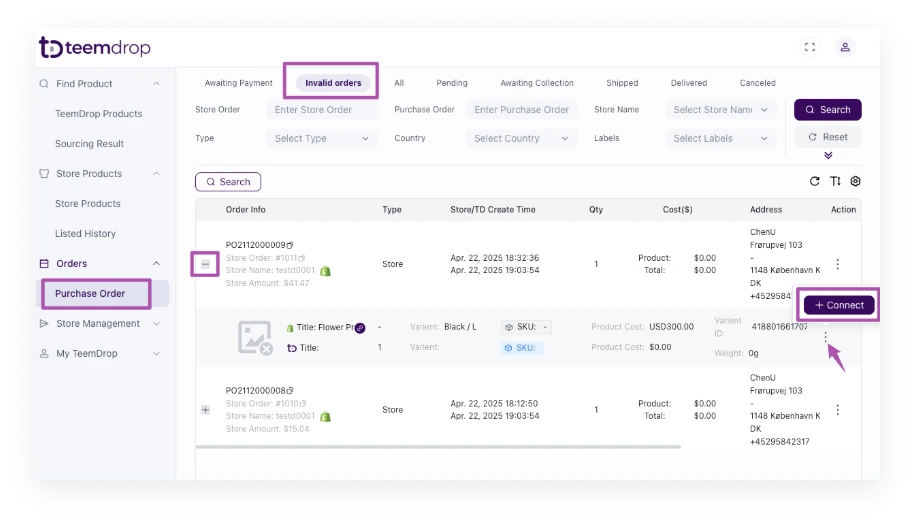
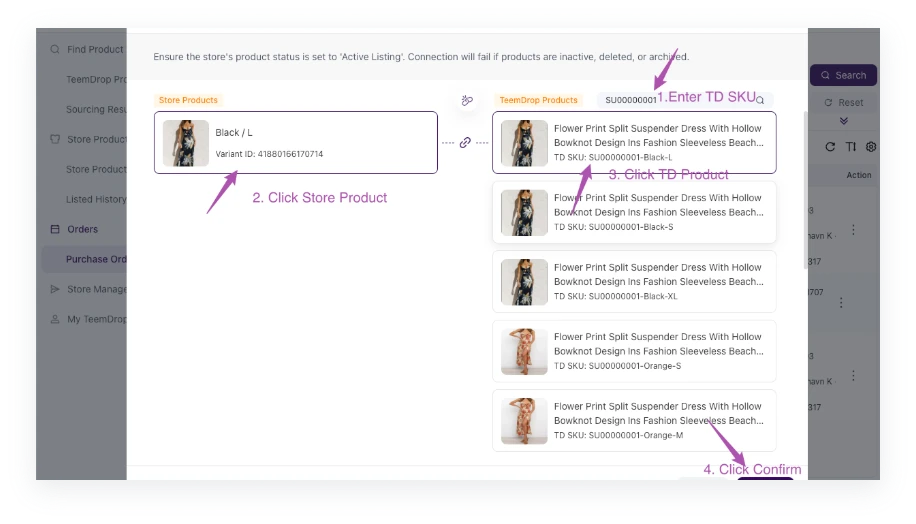
2. TD Product Removed
Problem: The original TeemDrop SKU connected to the product has been removed.
How to Fix:
-
Disconnected the old SKU on 【Connect List】
-
Find a new valid TeemDrop SKU that matches the product.
-
Reconnect the order/store product to the updated SKU.
3. No Available Shipping Methods
Problem:
The system can't offer shipping method due to:
-
Incomplete address (e.g., missing ZIP code, city, or region).
-
Product restrictions (e.g., hazardous items or region-specific limitations).
-
Remote addresses (e.g., rural areas or distant islands with no courier coverage).
-
Oversized/Overweight shipments (e.g., multi-item orders exceeding weight/size limits).
How to Fix:
-
For incomplete addresses: Click Edit Address and fill in missing details.
-
For restricted products: Contact your TeemDrop account manager to check possible alternatives.
-
For remote addresses:
-
Ask the customer to provide an alternative address.
-
Contact your account manager to check for other shipping solutions.
-
-
For oversized/overweight shipments shipments:
-
Split the order into smaller packages (if applicable).
-
Contact your account manager to check for other shipping solutions.
-
*If you are not sure the the factor contributing to the problem, you can contact your account manager for help.
4. On Hold
Problem: The order is paused due to an hold-on request by the customer on TeemDrop.
How to Fix:
- If you no longer want to place the order on hold, please reach out to the account manager to cancel the hold status.
Note: If the order is already in "Ready to Ship" status, it may can't be intercepted. Contact your account manager immediately to confirm the current status and discuss next steps.
